mirror of
https://github.com/flynx/colors.js.git
synced 2026-01-02 00:31:13 +00:00
 a1407aee04
Resolves #251 requesting documentation for the enable/disable functions. This documents them in the readme. My explanation doesn't really fit the tone of the rest of the readme, so I'm open to changing the wording
200 lines
4.2 KiB
Markdown
200 lines
4.2 KiB
Markdown
# colors.js
|
|
[](https://travis-ci.org/Marak/colors.js)
|
|
[](https://www.npmjs.org/package/colors)
|
|
[](https://david-dm.org/Marak/colors.js)
|
|
[](https://david-dm.org/Marak/colors.js#info=devDependencies)
|
|
|
|
Please check out the [roadmap](ROADMAP.md) for upcoming features and releases. Please open Issues to provide feedback, and check the `develop` branch for the latest bleeding-edge updates.
|
|
|
|
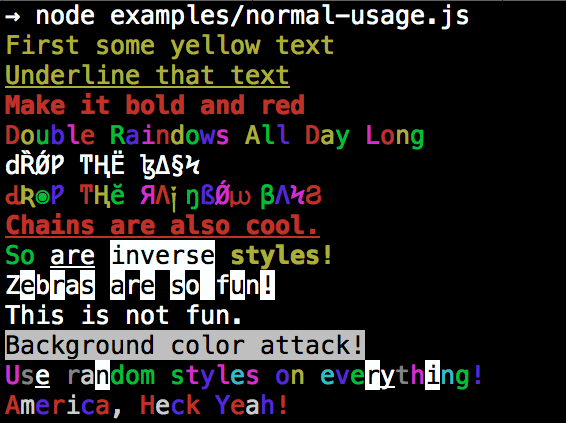
## get color and style in your node.js console
|
|
|
|
|
|
|
|
## Installation
|
|
|
|
npm install colors
|
|
|
|
## colors and styles!
|
|
|
|
### text colors
|
|
|
|
- black
|
|
- red
|
|
- green
|
|
- yellow
|
|
- blue
|
|
- magenta
|
|
- cyan
|
|
- white
|
|
- gray
|
|
- grey
|
|
|
|
### background colors
|
|
|
|
- bgBlack
|
|
- bgRed
|
|
- bgGreen
|
|
- bgYellow
|
|
- bgBlue
|
|
- bgMagenta
|
|
- bgCyan
|
|
- bgWhite
|
|
|
|
### styles
|
|
|
|
- reset
|
|
- bold
|
|
- dim
|
|
- italic
|
|
- underline
|
|
- inverse
|
|
- hidden
|
|
- strikethrough
|
|
|
|
### extras
|
|
|
|
- rainbow
|
|
- zebra
|
|
- america
|
|
- trap
|
|
- random
|
|
|
|
|
|
## Usage
|
|
|
|
By popular demand, `colors` now ships with two types of usages!
|
|
|
|
The super nifty way
|
|
|
|
```js
|
|
var colors = require('colors');
|
|
|
|
console.log('hello'.green); // outputs green text
|
|
console.log('i like cake and pies'.underline.red) // outputs red underlined text
|
|
console.log('inverse the color'.inverse); // inverses the color
|
|
console.log('OMG Rainbows!'.rainbow); // rainbow
|
|
console.log('Run the trap'.trap); // Drops the bass
|
|
|
|
```
|
|
|
|
or a slightly less nifty way which doesn't extend `String.prototype`
|
|
|
|
```js
|
|
var colors = require('colors/safe');
|
|
|
|
console.log(colors.green('hello')); // outputs green text
|
|
console.log(colors.red.underline('i like cake and pies')) // outputs red underlined text
|
|
console.log(colors.inverse('inverse the color')); // inverses the color
|
|
console.log(colors.rainbow('OMG Rainbows!')); // rainbow
|
|
console.log(colors.trap('Run the trap')); // Drops the bass
|
|
|
|
```
|
|
|
|
I prefer the first way. Some people seem to be afraid of extending `String.prototype` and prefer the second way.
|
|
|
|
If you are writing good code you will never have an issue with the first approach. If you really don't want to touch `String.prototype`, the second usage will not touch `String` native object.
|
|
|
|
## Enabling/Disabling Colors
|
|
|
|
The package will auto-detect whether your terminal can use colors and enable/disable accordingly. When colors are disabled, the color functions do nothing. You can override this with a command-line flag:
|
|
|
|
```bash
|
|
node myapp.js --no-color
|
|
node myapp.js --color=false
|
|
|
|
node myapp.js --color
|
|
node myapp.js --color=true
|
|
node myapp.js --color=always
|
|
|
|
FORCE_COLOR=1 node myapp.js
|
|
```
|
|
|
|
Or in code:
|
|
|
|
```javascript
|
|
var colors = require('colors');
|
|
colors.enable();
|
|
colors.disable();
|
|
```
|
|
|
|
## Console.log [string substitution](http://nodejs.org/docs/latest/api/console.html#console_console_log_data)
|
|
|
|
```js
|
|
var name = 'Marak';
|
|
console.log(colors.green('Hello %s'), name);
|
|
// outputs -> 'Hello Marak'
|
|
```
|
|
|
|
## Custom themes
|
|
|
|
### Using standard API
|
|
|
|
```js
|
|
|
|
var colors = require('colors');
|
|
|
|
colors.setTheme({
|
|
silly: 'rainbow',
|
|
input: 'grey',
|
|
verbose: 'cyan',
|
|
prompt: 'grey',
|
|
info: 'green',
|
|
data: 'grey',
|
|
help: 'cyan',
|
|
warn: 'yellow',
|
|
debug: 'blue',
|
|
error: 'red'
|
|
});
|
|
|
|
// outputs red text
|
|
console.log("this is an error".error);
|
|
|
|
// outputs yellow text
|
|
console.log("this is a warning".warn);
|
|
```
|
|
|
|
### Using string safe API
|
|
|
|
```js
|
|
var colors = require('colors/safe');
|
|
|
|
// set single property
|
|
var error = colors.red;
|
|
error('this is red');
|
|
|
|
// set theme
|
|
colors.setTheme({
|
|
silly: 'rainbow',
|
|
input: 'grey',
|
|
verbose: 'cyan',
|
|
prompt: 'grey',
|
|
info: 'green',
|
|
data: 'grey',
|
|
help: 'cyan',
|
|
warn: 'yellow',
|
|
debug: 'blue',
|
|
error: 'red'
|
|
});
|
|
|
|
// outputs red text
|
|
console.log(colors.error("this is an error"));
|
|
|
|
// outputs yellow text
|
|
console.log(colors.warn("this is a warning"));
|
|
|
|
```
|
|
|
|
### Combining Colors
|
|
|
|
```javascript
|
|
var colors = require('colors');
|
|
|
|
colors.setTheme({
|
|
custom: ['red', 'underline']
|
|
});
|
|
|
|
console.log('test'.custom);
|
|
```
|
|
|
|
*Protip: There is a secret undocumented style in `colors`. If you find the style you can summon him.*
|